
Design the Scope
As beautifully as the space.
Turn “What’s your budget?” into a complete plan. Align on what matters, clarify the full investment, and step confidently into selections and procurement.
- Don't undermine a great design with a poorly defined budget.
- Create presentation-ready budgets in minutes.
- Automatically capture markup, shipping, freight, receiving, and tax costs on every item.
- Present the complete scope from the start, including those final finishing details.
- Keep clients aligned at every stage, from first meeting to closeout.
Starting today, you can spend less time budgeting and more time designing.
Scope Visual Layout
Confidence in every detail.See the whole investment.
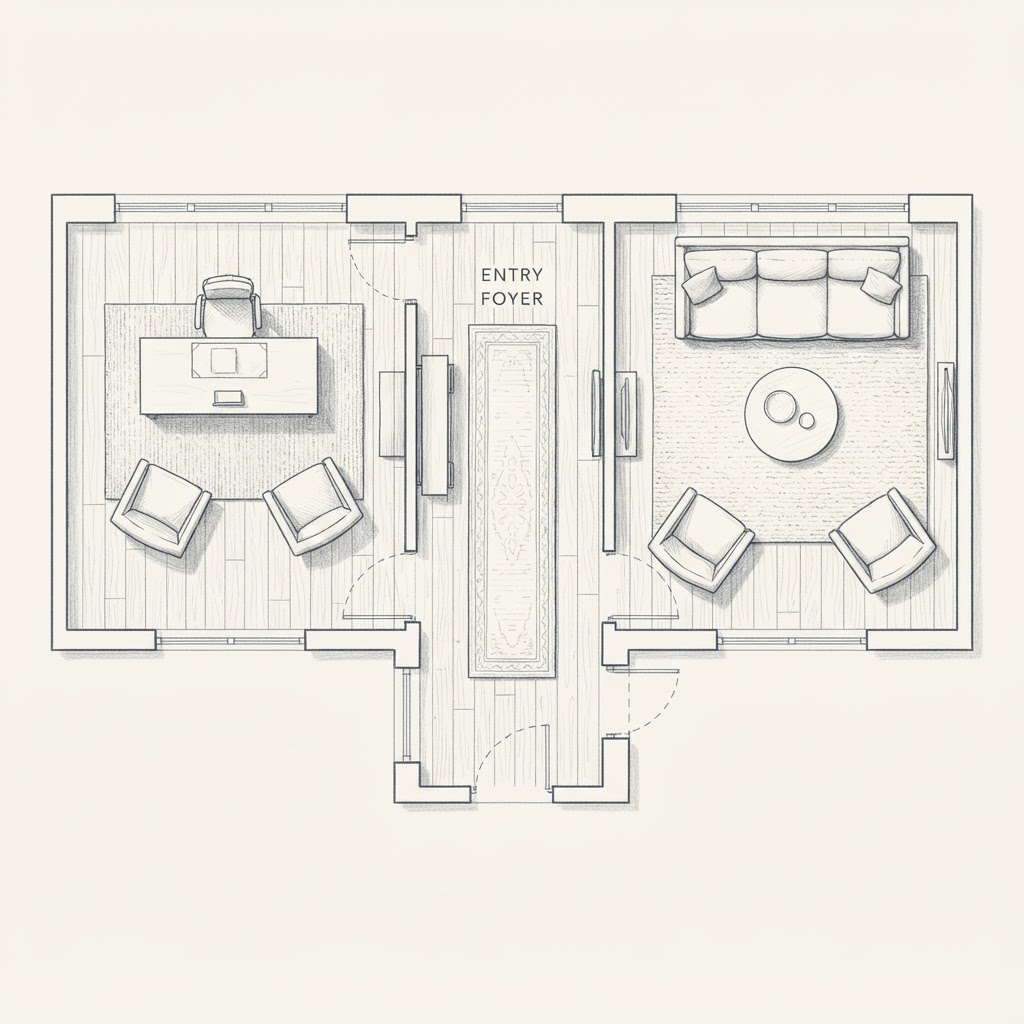
A complete scope is more than a complete list. Place your selections on a floor plan or rendering of your choosing, see how they come together, and use Scope AI to help find what might be missing before you present.
Scope Visual Layout
Your scope, connected to your space.
The investment
$19,800
6 selections, 3 spaces
Executive desk
Home office
Desk chair
Home office
Foyer console
Foyer
Three-seat sofa
Living room
Coffee table
Living room
Entry pendant
Awaiting placement
Scope AI
Give every item a place.
Tag scope items to their spot on your floor plan or rendering.
Catch the gaps.
Completeness checks spot missing items before you present.
Make it tangible.
Connect the budget to a visual plan, not just numbers.
Pricing
Transparent Tiers, No Surprises
Start free and scale as your studio grows. Each tier builds on the last, and unlocks greater scope control and client alignment. Paid plans include a 14-day free trial with full access.
Plan details
Features
Add-ons
Extra active projects: $15/mo · Extra user seats: $10/mo on all tiers. Client Portal and Materials & Files are available only on Plus and Pro. Starter and Foundation users must upgrade to access these features. Foundation, Plus, and Pro each include up to 7 scopes per active project.
Frequently Asked Questions
Everything You Need to Know
An interior design scope is the agreed understanding of what a project includes, at what level of quality, and what that implies for cost. It names the rooms involved and the standards within them. A clear interior design scope keeps budgets, selections, and client expectations aligned from the first meeting to the final closeout.
Scope is a budget and scope management platform purpose-built for interior designers and design studios. It helps design professionals create polished budgets, track project spending with precision, and keep clients aligned throughout the project lifecycle. Scope is built by members of the trade, for the trade.
Scope AI is an AI assistant for interior design scope and budget planning, a helping hand, not a replacement for your expertise. It helps organize scope items and flag potential gaps, such as overlooked furnishings or room essentials, so you spend less time on administrative work and more time designing. By bringing those details into the conversation early, Scope AI helps you think through what belongs in the budget before missing items become unwanted cost creep during a project. You always have the final say: review, refine, or leave out its suggestions based on your design intent, client priorities, and professional judgment.
Scope lets designers build professional budgets organized by room, category, or phase in minutes instead of hours. It includes a tiered item library with quality options (Quality, Premium, Luxury, Luxury Plus), reusable items across projects, automatic totals and subtotals, and watermark-free PDF exports with your studio branding.
Yes. Scope replaces spreadsheet-based budget tracking with a purpose-built tool that provides real-time budget visibility, client approval workflows, version history, and actual cost tracking. On Plus and Pro, the Client Portal gives your client a personalized view of where their investment stands and creates a clear approval trail for every change.
On Plus and Pro, Scope gives each client a personalized portal showing exactly where their investment stands. Designers send budget updates and change requests directly through the platform, clients review and approve in one place, and every interaction is documented with a clear record of what was agreed. This eliminates the need to resend spreadsheets and reduces end-of-project disputes.
When items change, whether a product is discontinued or a client upgrades a finish, Scope makes it easy to document the change, communicate it to the client, and capture digital sign-off. This creates clear approval trails that protect your margins by avoiding awkward surprises at project closeout.
Yes. Scope offers a free Starter plan that includes 1 active project, up to 2 scopes per active project, 1 user seat, library-based scope building, personalized library editing, and client send and sign-off for 1 project. Paid plans start at $29 per month (Foundation) and include a 14-day free trial with full access. Foundation includes 3 active projects and 3 user seats, Plus includes 5 active projects and up to 5 user seats, and Pro includes 15 active projects and 15 user seats. Foundation, Plus, and Pro each include up to 7 scopes per active project. Client Portal and Materials & Files are available only on Plus and Pro; Starter and Foundation users must upgrade to access them.
That's entirely up to you. In calculating appropriate design fees or reimbursable expenses for a project, many interior designers will include the cost of the tools they use to more productively, effectively, and responsibly complete client projects. We believe in transparency at all levels of a project, so if you plan to include your subscription as a reimbursable cost for a project, simply add it as a line item to your next Scope. We also believe the value realized by both designer and client is much higher than the Scope monthly subscription costs, not only does effective scope management protect a designer's margins, it also protects clients from unnecessary financial surprises.
Start Designing
Scopes That Impress
Deliver projects your clients understand and trust, and turn scope management from a chore into a competitive advantage.
14-day free trial, or schedule time with our team.
Stay Up to Date
Product updates and industry insights. No spam, unsubscribe anytime.